
Step 1: Register with the Rodel Portal (This is a once-off step).
Type in https://apps.rodel.co.za into your internet browser.
Click on “Don’t have an account?”

Step 2. Complete the four fields and click REGISTER:
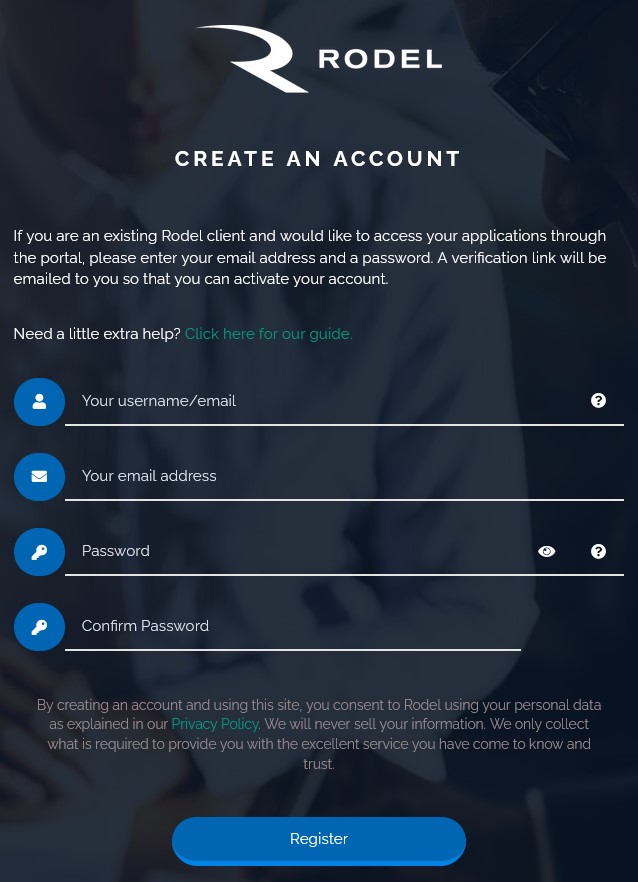
Choose your own username / use your email address that is registered with Rodel:
- Please do not put any spaces in your username – Please remember your username – it is important for Step 2.
Enter your email address:
- If there is an error with your email address (e.g.it is a shared company email address) you will be prompted to contact Rodel.
Choose your own password:
- At least 10 characters
- 1 special character
- At least 1 capital letter
- At least one number and letter.
Step 3. You will receive an email from Rodel – please click on activate my account.
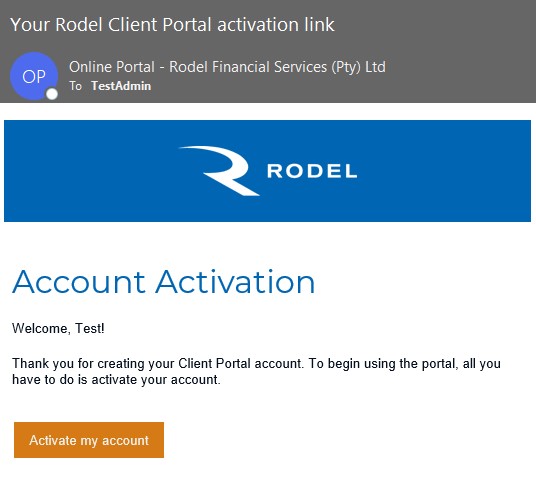
You are now set up and ready to go! Whenever you need to complete an app, log in and select the transaction relevant (Sellers advance/Bond advance etc) and you will be prompted through the application form. Print, sign and send with requested supporting docs to apps@rodel.co.za or alternatively use our electronic signature functionality.
Take me back to the training menu